Showing posts with label other. Show all posts

Tuesday, August 5, 2008

My new Xwinwrap gui Gwinwrap


I'm pleased to announce the first public version of my pygtk app Gwinwrap. It's still very new, and most likely buggy, but if you feel like trying it the code is at Google Code.
Basically, it finds all your xscreensavers and lists them, with a preview. You can choose to start the xwinwrap screen with opacity, and choose whether or not to use a nice command before for better cpu management. Xscreensaver Arguments are also accepted in the input box.
Hope you like it!

Wednesday, May 7, 2008

Compiz Fusion Sphere is here! Yay!

All hail Desktop Sphere!

Finally, onestone has managed to code the desktop sphere many people were waiting for! He wrote about it on his blog. It's quite a neat plugin, and also merges the cubecaps plugin with the cube addon plugin, making for less plugins to worry about (the cubecaps plugin was sort of minor in the configurations, anyway).

Only available in git of course, but great to try out for those of us who have access to that ;)

And digg it too so others know: http://digg.com/linux_unix/Compiz_Fusion_Truly_Spherical_Desktop_View_Arrives

Blog post: http://dev.compiz-fusion.org/~onestone/blog/?p=10

Edit: sorry about messing up the planet, it's an annoying bug :(

Edit 2: To clarify, the sphere is available in the "Cubeaddon" plugin.

Tuesday, April 15, 2008

A call for feedback :)

NOTE: Comments have been closed... please go to the post in the forums instead so we have one thread instead of two! Thanks a lot! :)

Hey, according to the poll on the top right of this blog, a LOT of you liked this recent episode! Thanks a lot for letting me know your opinions (and if you didn't like it feel free to voice that view as well).

I was reviewing the episode just now, (since I made it around midnight and want to make sure I didn't make any horrible slipups, and that kind of thing happens around then), and I was thinking maybe I should post the music info near the beginning of the video as in a music video (and some austrian ads I've seen).

That got me into thinking that I don't nearly get as much feedback as I should. I would really like to know how you think I could make this better. Seems you guys liked the animation at the beginning and the more-smooth syncing with the beat at the beginning.

However, in my current style, I don't really have too much to videoblog about between big visual updates like the cylinder. I just make a video demonstrating the latest and greatest coming out of the great minds of our Compiz Fusion coders. I can't make a videocast about every bugfix, of course.

But I get the feeling that people don't like these long gaps... a videocast should be more regular, it seems. Should I post solutions to common problems? Configuration tutorials? Perhaps other recent developments in the world of Linux awesomeness? Please... let me know via the forum post.

(speaking of which, I hadn't realized that you needed a google account to post a comment with my settings, and have since changed that... all are now welcome as long as they get past the CAPTCHA!)

Saturday, December 15, 2007

Clarification about shelf

Some folks were confused about the use of shelf, so I decided to post my idea right here on the blog. Kristian (the developer working on it) doesn't want to do the group integration, because he doesn't feel that it's good to have a dependency on it. But other than that he's going to base it on the following forum post (and how miniwin was in its old stages):

Another Plugin Idea: Shelf Plugin
Now, I wish i could code this, but I don't know anything about it. But here's my idea.

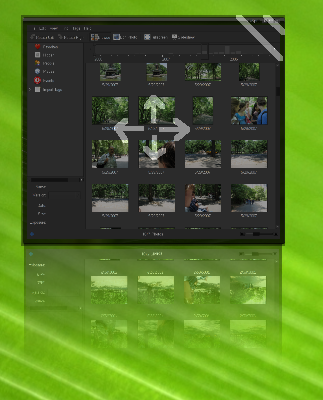
We have a new plugin called "Shelf". It requires the group/tab plugin to work (and integrates well with it). The basic idea: When you initiate the event, the plugin scales down to a small size that sits on your desktop (with a nice reflection). Here's a mockup: Ok, now we have a mockup of a mouseover (of course it would look slicker, i just drew this with the pencil tool):

Here's another idea: A different mode called "card" mode that would look like this (and enable rotation, etc): [this was added before freewins was invented, right now we might be able to just have freewins do this]
For more, and the discussion, click here.

Thursday, December 13, 2007

Note to self...

NEVER USE NTSC MODE IN KDENLIVE.

The audio won't work.

That is all.

By the way, I'm exporting a nice quick video now. Look forward to it very soon!

Thursday, September 27, 2007

How To Install Kiba-Dock SVN

So, I've been very busy at school, but since people have asked, here is a short howto for Kiba-Dock. I hear the AWN instructions are easier to find...

First, install Subversion to download the source code:

sudo apt-get install subversion

Then visit this page, and install the dependencies (using Synaptic Package Manager, and including the names with -dev).

run:

svn co https://kibadock.svn.sourceforge.net/svnroot/kibadock/trunk/ kiba


and then:

ls


and then take a look at the list. There should be about five blue items. You'll want to go into each of these with the cd command:

cd akamaru

for example. After you cd into it, run:

./autogen.sh
make
sudo make install


and then when those commands are done, run:

cd ../insert_next_directory_name_here

and do the three commands again.

Once all of that is finished, you should be able to launch kiba-dock from your menu. Good luck!

Wednesday, September 5, 2007

Infobyte: Emerald Themes and Skydomes

If you want some neat Emerald themes and Compiz Fusion Skydomes, try http://compiz-themes.org . They have lots of different things on there.

Tuesday, September 4, 2007

Infobyte: How I record my desktop

I installed xvidcap for ubuntu, and then used the terminal version with the following command:

xvidcap --file filename.mpeg --fps 15 --cap_geometry 1680x1050+0+0 --rescale 25 --time 200.0 --start_no 0 --continue yes --gui no --auto

That will capture 200 seconds of video at fullscreen 1680x1050 resolution, but scaled down 25 percent, with 15 frames per second.

Hope this helps prospective videocasters!

Monday, September 3, 2007

Check out the Wiki


While you're waiting for me to finish that special short videocast I'm working on with a comparison between Avant Window Navigator and Kiba Dock (oops, i wasn't supposed to tell you that! :D), why not check out the new Compiz Fusion Wiki? Parts that may be most useful to you:
  • The Hardware guide -- for setting up your video card to run compiz fusion
  • The Distributions guide -- links to instructions for your distro
  • The Troubleshooting guide -- informs you what you should see on startup and how to check for problems
I'm proud to be the owner of the desktop displayed in the Welcome page's screenshot, as well as the shots in the Animations section.

Friday, August 31, 2007

Extremely easy way to install Compiz Fusion

While there's no FusionCast episode yet, I have managed to get kdenlive working again! I made a page for those who need help installing Compiz Fusion. Check it out, there's a video on there too.

Look forward to something new, now that I can make videos again.

http://fusioncast.fsckr.net/newb

Wednesday, July 18, 2007

For Your Viewing Pleasure...


On IRC, we decided to open as many windows as possible with loose-binding enabled without it getting the black window bug.

This is the limit (the screenshot window was black). 65 windows, with 256MB VRAM